In short: A 1,000-activity Primavera schedule is about 360,000 tokens of text, nearly three times an illustrative 128,000-token context window, and the complete outputs planners need are larger than a single chat response. Tools such as code interpreter can process the full file, but a deterministic script is not a standardized method: 100 planners need one validated calculation, not 100 generated ones. The workflow that scales is simple: automation computes anything with a single defensible answer, AI interprets and proposes, and people decide.

Years ago, I was the family tech guy. Friends and relatives would call with computer trouble, describe it in two sentences, and expect me to fix it over the phone. I needed the machine in front of me to inspect it, trace the fault and test the fix. So when someone asked what was wrong with their computer, I would tell them: Hold the phone up to it so I can hear what it is doing.
It was a joke, the same one a mechanic makes about a car that is making a noise. But it carried a serious point. You cannot diagnose a system you can only hear part of.
The new version of that phone call is dropping a schedule into a chatbot and expecting the answer to come back whole. Every few weeks, someone in project controls asks whether a Primavera schedule can simply go into an AI assistant such as Copilot to run the quality checks, build the Power BI dataset or produce a smaller model for risk analysis.
It is a fair question. I use AI every day and want project controls professionals to benefit from it. But a useful explanation, a complete dataset and an assured calculation are different deliverables, and they need different evidence.
Two halves, one boundary
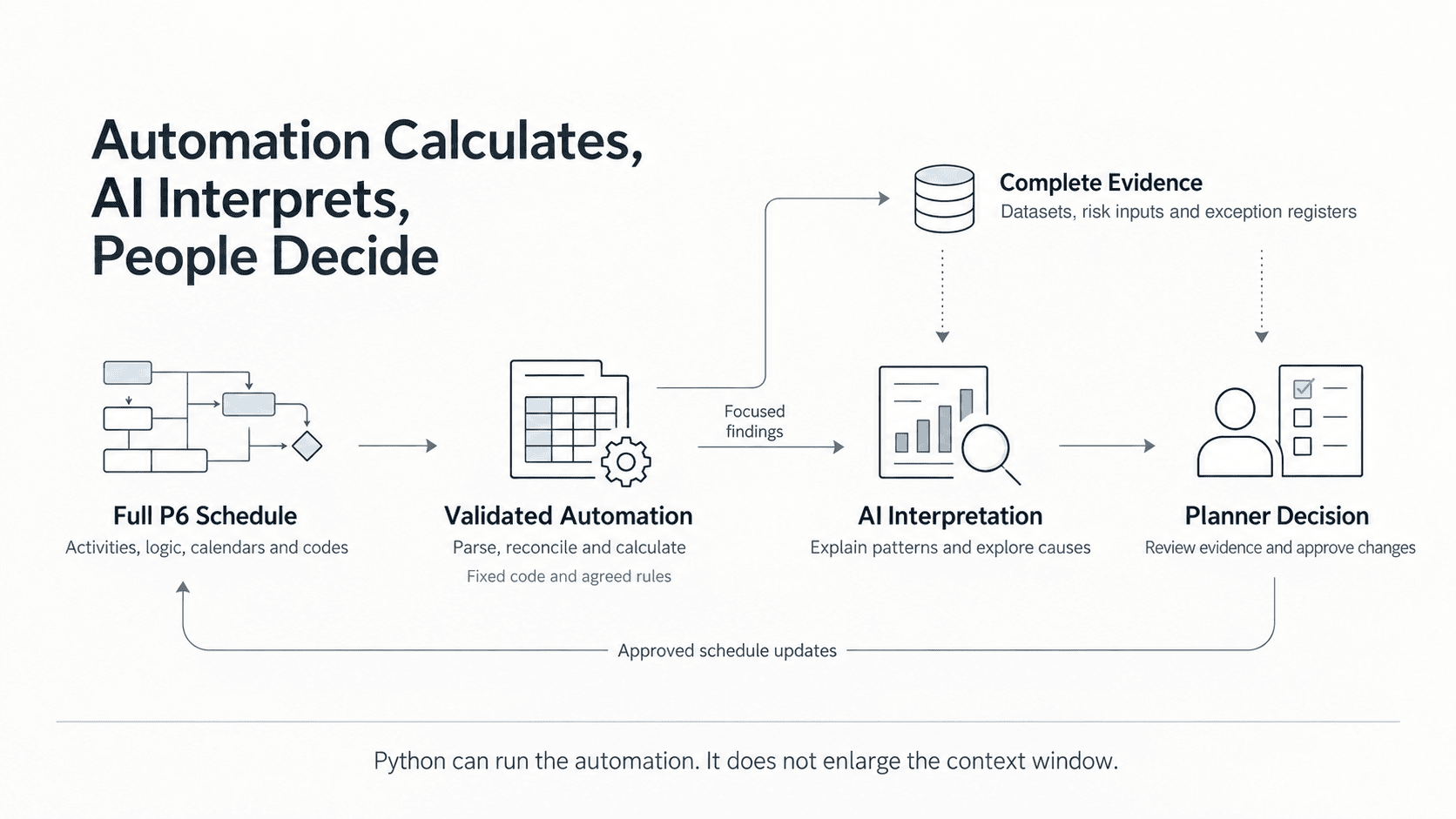
Automation computes anything with a single defensible answer: a count, a date, a float value, a percentage against an agreed population. Intelligence interprets, explains and proposes: why a date moved, which interface is driving the slip, what a correction might look like. Most of the trouble with AI in planning comes from asking one to do the other's job.
They are not competing approaches. They are two halves that have to be wired together properly, with a hard boundary between them. The central idea is to make the planner faster and better informed without moving accountability away from the planner. That is the frame for everything that follows: automation calculates, AI interprets, people decide.
A schedule is a database, not a document
An XER is a text export of related Primavera tables. Activities, relationships, calendars, resources and codes are linked by identifiers. [1]
| Table | What it carries | Rows |
|---|---|---|
| TASK | Activity attributes, dates, durations, float and status | 1,000 |
| TASKPRED | Predecessors, successors, relationship types and lags | 1,400 |
| TASKACTV | Activity-code assignments across six categories | 6,000 |
| TASKRSRC | Resource assignments | 200 |
| PROJWBS | Work breakdown structure | 100 |
| Other tables | Project settings, calendars, code definitions and resources | Supporting records |
Some questions are simple. Counting activities with stored negative float means reading one field under agreed population rules. Recalculating float is different: it needs a scheduling engine to apply logic, calendars, constraints and settings. A credible tool must know which it is doing and label the result accordingly. The scheduling system of record stays the reference, and anything recomputed elsewhere is labelled as computed.
How big is a schedule to a language model?
Models read text as tokens: words, word fragments, number pieces and punctuation. Plain English compresses well. Dates, IDs and structured fields do not.
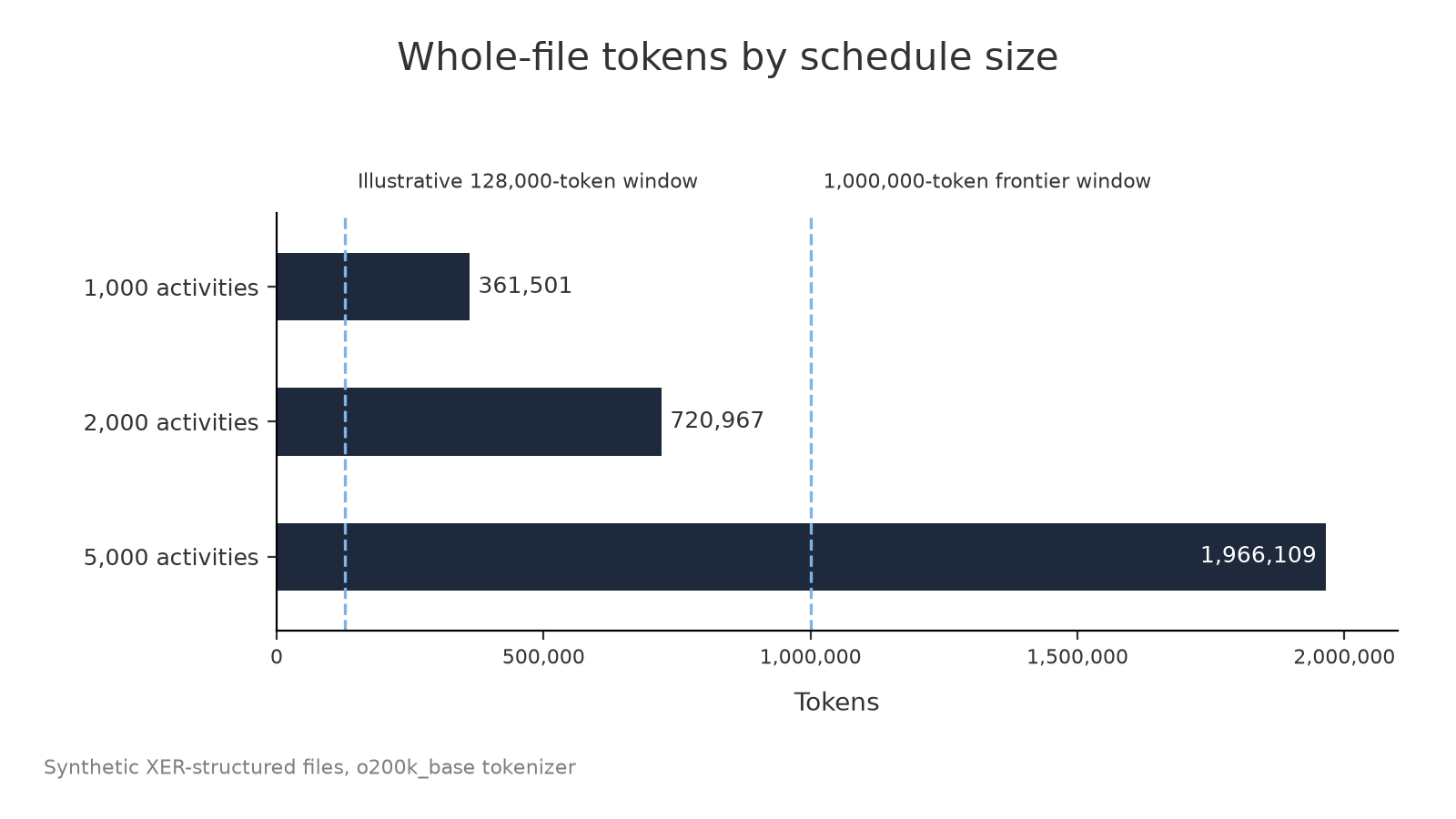
I measured synthetic XER-structured files at 1,000, 2,000 and 5,000 activities, each with 60 fields per activity, using the o200k_base tokenizer, and published the script and files so anyone can rerun it. [2] These are controlled examples, not real project exports, and they measure text size, not schedule quality.
| Measure | 1,000 activities | 2,000 activities | 5,000 activities |
|---|---|---|---|
| Code categories per activity | 6 | 6 | 8 |
| Relationship rows | 1,400 | 2,800 | 7,000 |
| Resource assignments | 200 | 400 | 3,000 |
| File size, decimal MB | 0.627 | 1.249 | 3.366 |
| Whole-file tokens | 361,501 | 720,967 | 1,966,109 |
| TASK-table tokens | 251,753 | 503,219 | 1,257,953 |
| Relative to an illustrative 128,000-token window | 2.8 times | 5.6 times | 15.4 times |
| Relative to a 1,000,000-token frontier window | 0.36 times | 0.72 times | 1.97 times |
The files averaged about 1.7 characters per token, which is why a few megabytes becomes a very large input. Activity count is not the only driver: holding the 5,000-activity file to the lighter coding and resource profile drops it to 1,799,701 tokens. A file-upload allowance in megabytes says little about how much of the content a model can actually consider.
These counts do not depend on any subscription or licence. Other models tokenize differently, so exact figures will shift, but the scale will not. Compare them against whatever window your own tool provides. Real exports can also carry baselines, user-defined fields, notebooks and steps, which add to the size.
The context window is shared space
The context window holds everything the model can use for one response: instructions, retained conversation, file content and tool results. A long conversation, detailed agent instructions or large tool outputs all leave less room for the schedule.
| Allocation | Fresh conversation | 30,000 tokens of history | 60,000 tokens of history |
|---|---|---|---|
| System and agent instructions | 8,000 | 8,000 | 8,000 |
| Current request and other evidence | 12,000 | 12,000 | 12,000 |
| Retained conversation | 0 | 30,000 | 60,000 |
| Reserved generation budget | 8,000 | 8,000 | 8,000 |
| Remaining space for schedule text | 100,000 | 70,000 | 40,000 |
A better prompt improves the instructions but does not add capacity. Licences and product names do not establish the effective context available to a task either. Microsoft does not publish a per-seat context limit for Microsoft 365 Copilot, which is why this article uses an illustrative figure rather than claiming a measured one.
Uploading is not processing
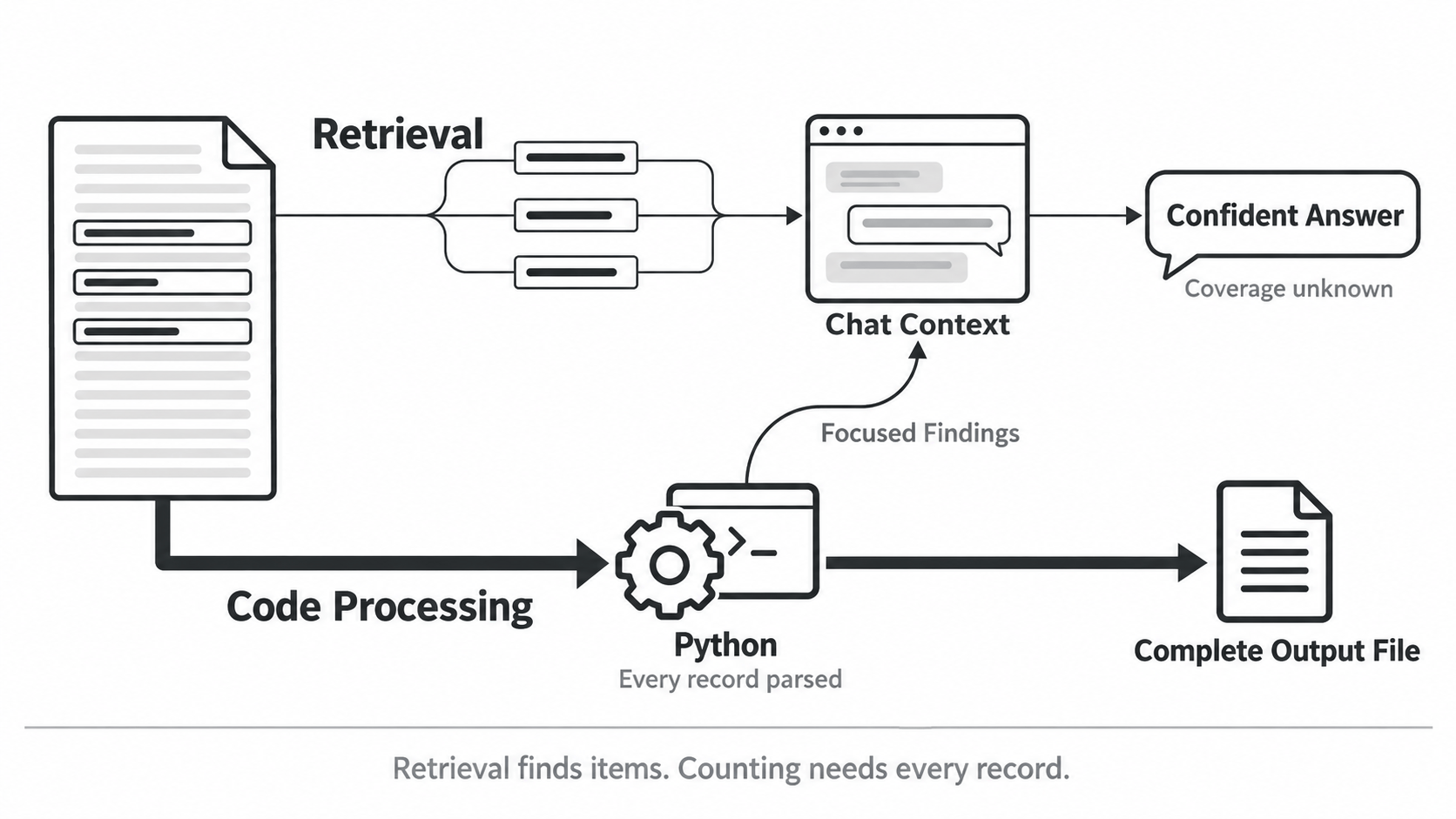
Renaming an XER to TXT may get it accepted. It does not turn it into a validated dataset or prove every record was examined. Some workflows place text in context and retrieve passages as needed; others run code on the file. [3, 4] Retrieval finds a particular item. A whole-schedule count needs the complete eligible population, which selected passages cannot prove, however confident the answer sounds.
Two common workarounds do not change that. Exporting an activity list to Excel makes the file smaller, but without the relationship tables it cannot support logic checks. Even a lean template is substantial: a 13-column activity list for 1,000 activities is about 63,000 tokens, and writing a schedule back out at that size takes multiple responses. Asking an agent to work through the file in chunks is automation by another name, and it still needs a defined method to join and reconcile the pieces.
Code interpreter changes the path. Copilot and other assistants can write and run Python in an isolated environment, including generating downloadable files. [5, 6] With the full file available, Python can parse every record and write the output without putting each row into the model's context.
The window has not grown. The processing has moved outside it, and the chatbot is now acting as an automation layer. That only works if the script returns concise results rather than printing the dataset back into the chat, and if the executed method, row counts, rejected records and settings can be inspected. An answer about the schedule should come from that evidence, cited by activity ID, field and count, never from model memory.
Deterministic is not the same as standardized
A fixed script returns the same result for the same inputs and settings. That is valuable, but a consistently wrong formula is still wrong. Validation is what makes a result defensible.
Now imagine an organization deploying an agent to 100 planners. Their schedules should give different results. The method should not differ. If the agent writes new code for each request, it may treat completed work, milestones, level-of-effort activities or missing values differently each time, or convert hours by a fixed day on one run and by activity calendars on the next. Every script runs deterministically, and the organization still gets incompatible assessments.
A simple example: 40 exceptions divided by 800 eligible activities is 5%. The same 40 divided by all 1,000 activities is 4%. Both sums are correct. Only an agreed population tells you which one to report.
That is the role of a trusted calculation layer: parse the complete source, apply declared metric definitions and expose the populations behind every result. Its limits matter as much as its outputs. A missing input is reported as not evaluable with the input named: never zero, never a pass by default. Custom checks are labelled and calendar approximations visible. Every number carries its source: an unlabelled number is a defect, and an unproven result is not a verified one. It supports professional review; it does not replace it.
I do not need a language model to rediscover that 1 + 1 = 2 every time a planner runs a report. I need a trusted calculation layer, in Excel, Python or another approved system, and an assistant that helps us understand what it found.
The output is just as big
A narrative of the main findings is short. The datasets planners actually use are not.
| Output | 1,000 activities | 2,000 activities | 5,000 activities |
|---|---|---|---|
| Activity flat file, 13 columns | 63,039 tokens | 126,039 tokens | 315,039 tokens |
| Risk-input table, 6 columns | 20,025 tokens | 40,025 tokens | 100,025 tokens |
| Example exception register | 6,852 tokens | 13,712 tokens | 34,292 tokens |
| Compact briefing | 991 tokens | 991 tokens | 992 tokens |
With an illustrative 8,000-token response budget, even the 1,000-activity flat file needs nearly eight full responses.
Larger input windows do not solve this, because output limits are separate and smaller. Frontier models that accept 1 million tokens of input commonly cap a single response at about 128,000 tokens, less than half the 5,000-activity flat file. [10] Input capacity is growing faster than what a model can write back in one answer.
These figures limit text written into the chat, not downloadable files: code interpreter can write a complete CSV or workbook and return a link. [6] So the question is not whether a chatbot can produce a large file. It is whether the file came from a complete, checked transformation. A dataset stitched together across chat responses needs reconciling for missing or duplicated rows, shifted columns and mixed units.
The compact briefing is where AI earns its keep. At 1,000 activities, 125 full files come to about 45.2 million tokens of text; 125 briefings come to about 124,000, roughly 365 times less. A briefing cannot carry every dependency, so keep the full evidence available and let the assistant pull specific rows when a question needs them.
A smaller risk model is a modelling task
Turning 2,000 activities into 200 for risk analysis is not just deleting rows. The reduced network must keep the key handovers, parallel work, calendars, milestone drivers and risk exposure. Grouping by name or WBS can remove a controlling interface, double-count concurrent work or hide a near-critical path, and the tidy result can still behave differently from the source.
AI can propose and explain groupings. A controlled transformation keeps the source-to-model mapping, documents how durations and logic were derived, and tests the resulting dates against the source. Monte Carlo results are reproducible only when assumptions, distributions, correlations, settings and random seeds are recorded. Risk ranges need evidence and expert input. Where intent or data is unclear, the ambiguity is named, never guessed, and a language model should not invent ranges to fill an empty column.
Building schedules: a proposal is not a write
AI is genuinely useful for building schedules. Describe a new scope package in plain language and a model can draft the activities, logic, durations and coding in minutes. Minutes of drafting can replace an afternoon of manual entry, provided the review stays exactly as rigorous.
The draft is a proposal, not a write. It should land as one reviewable change with a full before and after, its basis written out and durations used only where they were stated. Large drafts belong in an editable grid or a staged file, not a chat reply, for the same output reasons above. The engine recalculates the result, not the model, and approval, application and export stay with a person. That boundary has to be enforced by the system, not the prompt: an instruction telling a model not to write is not the same as a model that cannot write. The boundaries are design decisions, not gaps.
Bigger context windows will help, but they are not the method
Larger windows will allow richer evidence and more reasoning, and we should welcome them. But capacity is not reliability. A 2025 Chroma study of 18 models found performance generally declined as input length grew. [7] Longer context also costs memory and infrastructure that better caching reduces but does not remove. [8] The IEA projects global data-centre electricity demand roughly doubling from 485 TWh in 2025 to about 950 TWh in 2030, with bottlenecks in power, grid connections, equipment and chips. [9]
None of that needs a forecast to settle. A larger window still does not define DCMA populations, validate a calendar conversion or guarantee a complete export. More capacity expands what an assistant can attempt. A controlled method establishes what a team can rely on.
The workflow that scales
Automation reads the complete source, reconciles it, applies the agreed calculations and writes full datasets in fixed schemas with the method and assumptions recorded. AI reads the schedule through that layer's briefing and tools, explains findings with the driving chain rather than just the date, spots patterns across disciplines and turns a quality report into a remediation plan, not a list, keeping its proposals distinct from facts in the data. People review the evidence and decide what changes, and that judgment matters more as the task moves from counting exceptions to changing logic or recommending a delivery strategy.
The model is a component, not the product. It should be swappable without touching the layer that produces the numbers, which is the difference between something that survives a model upgrade and an experiment that has to be redone.
To fellow project controls professionals
I share the ambition. We want planners spending less time preparing data and more time understanding the project, and AI can help, including by helping build better automation. The strongest results come when the calculation method is explicit, the evidence is traceable and the assistant gets clean information to reason with.
This is the most useful frame I have found for where AI fits in planning. The measurement pack is published so anyone can rerun it. I am happy to walk anyone through it, and equally happy for people to pull it apart.
Nobody has to hold the phone up to the computer anymore. We just have to give the right tool the whole machine.
Automation calculates, AI interprets, people decide.
Sources and measurement notes
- Oracle, P6 Professional Importing and Exporting Guide, Import/Export file formats. Read source
- Reproducible synthetic token experiment, 12 October 2026. Python 3.12, tiktoken 0.14.0, o200k_base, UTF-8 with LF line endings, decimal MB. Generator, fixtures, row counts, hashes and token manifest: download the measurement pack (1.7 MB zip). Tests serialization size and record reconciliation, not P6 importability, CPM correctness or chatbot accuracy. Tokenizer
- OpenAI, Optimizing File Uploads in ChatGPT Enterprise. Used for the distinction between retrieval and code processing only. Read source
- Microsoft Support, File formats supported by Microsoft Copilot. Read source
- Microsoft Learn, Frequently asked questions about Microsoft Copilot Chat. Read source
- Microsoft Learn, Add the code interpreter capability to your agent. Read source
- Chroma, Context Rot: How Increasing Input Tokens Impacts LLM Performance, 14 July 2025. Read source
- NVIDIA, Introducing NVIDIA BlueField-4-Powered CMX Context Memory Storage Platform, updated 16 March 2026. Read source
- IEA, Key Questions on Energy and AI, executive summary, 2026. Read source
- elvex, AI Model Context Window Comparison 2026: Advertised vs. Real, August 2026. Advertised input windows and output caps by model. Read source